


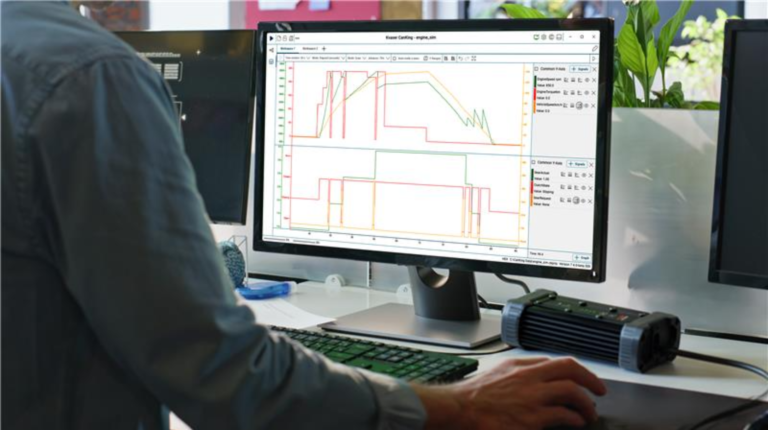
Kvaser has released CanKing 7.4.0, the latest update to its free CAN/LIN analysis environment, which introduces several features, most notably the Signal Plot extension, which enables real-time plotting of CAN and LIN signal values for fast and lightweight system visualization.
Signal Plot is a free, downloadable extension for CanKing 7.4.0 or later that allows engineers to track multiple signals simultaneously, zoom into events, compare values using cursors and switch between live and pause modes. The extension provides engineering-unit graphing directly within the CanKing workspace, making it particularly useful for HIL bench bring-up and on-site debugging.
“Our goal with Kvaser CanKing has always been to give engineers the clarity they need with as little friction as possible. Signal Plot does exactly this; turning raw CAN and LIN data into clear, meaningful visuals in real time. It’s a simple yet powerful upgrade that delivers an immediate boost in understanding and efficiency,” said Martin Sventén, CEO of Kvaser.
The update is designed to provide engineers with faster, more intuitive insights into system behavior, making real-time monitoring and debugging of automotive networks simpler and more efficient.
The extension is the first built on Kvaser’s CanKing Extensions SDK, which was launched last year, to enable users to create web-based GUI extensions such as dashboards, gauges and custom interpreters without modifying the core application. The SDK leverages React and is compatible with both Windows and Linux systems.
CanKing 7.4.0 also adds support for LIN message logging and replay using MDF4.x files. Improved MDF4.x compatibility ensures that LIN data frames are correctly recognised, enabling the Message Logger and Message Replay nodes to function seamlessly across both CAN and LIN traffic.
CanKing 7.4.0 was unveiled at at Embedded World 2026 in Nuremberg, Germany.
Related news, Kia focuses on NVH reduction in EV2 development